004
Navigating the chaos
I’ve been wanting—with all my soul—to write about this—but somehow couldn’t, for the life of me—to share some ADHD management tricks, and put things in perspective for myself. Plus maybe hopefully get some fresh ideas from people with the same diagnosis. So here I am, on a Monday night, writing some notes on how I navigate the chaos that is ADHD.
Returning to baseline
Let’s get this out of the way: medication is useful1 to people with “this stupid idiot disease” (courtesy of some internet user). One of the things it helps me with is allowing me to be lazy.
If you’re no stranger to the sinister vibe that is executive dysfunction, you may inflict upon yourself the torture of asking “Am I lazy or is it executive dysfunction?” regularly. The good news is that the difference lies in the mental burden, and it can go away. Let me sum it up:
- Laziness? No mental burden.
- Executive dysfunction? Immense mental burden.
I found this apt description on a Reddit thread: moving things from the executive dysfunction basket to the laziness basket to lessen the mental burden may be a good coping mechanism. The thing is, I’m only able to do that after I started taking stimulants. Now, when I have so many things to do and nothing seems to get done, I feel much less anxious than before, because I know I’m more than capable of resolving them. Or I allow myself to rest without guilt. Such a simple state of mind, such a ridiculously long period of time to achieve. Believe it or not, I only felt anxiety-free for the first time in years last year.
The key is to return to a workable baseline so that life can happen.
Reducing friction
Dealing with the flawed executive function, the flawed memory, and the flawed grasp on time—all at the same time—is a lot. Over the years, without medication, I’ve built up certain habits to cope with forgetting and losing things. These are a few effective-to-me tricks.
Stack connected steps together
I guess this is similar to habit stacking, in principle? Anyway, I used to live in an apartment complex that required a keycard to use the elevator, so my motorbike key and the building keycard always went together in this MUJI cardholder (non-affiliated link), minus the lanyard. I never forgot to grab my motorbike key when I got home, because I needed my cardholder keychain to get back in. Pretty foolproof, no motorbikes have been lost.
Invest in quality-of-life products
You know how mundane, repetitive tasks drain us out. For the longest time, I dreaded doing laundry because I dreaded hanging the clothes to dry. I used to run the washing machine twice countless times because the clothes sat in the machine forever. But since I got a dryer, it has lifted so much of the stress. This applies to other boring chores as well. If you have the means, I highly recommend making your life easier by investing in machines that make you less stressed and anxious on a daily basis.
Have multiple copies of the same thing
I own three sets of laptop chargers—one at home, one in my backpack for when I go to cafés, one at my workplace when I worked onsite. Would have saved me embarrassing midnight texts to someone asking to borrow their charger, because I forgot mine at work, if I had done this earlier. I guess the reasonable middle ground can be two sets of things in the same category—one stationary at home, one always with you? I also get ready quicker this way.
Get more excited when you lose things
Or low-impact things, at least. Because now you can try new brands and new products. What else to do?
The same principle across these tactics is to preserve my energy and cooperate with my memory. By reducing friction against things I need to do but dread, I get more things I need to do and love done.
Unfortunately, you’ll just have to spend money.
Managing work, life, and digital assets
A good overall strategy is to simplify my stack with straightforward products I love using. Another vague specification for me is that the product should also feel cozy. After having tested out a lot of apps to keep me sane (in vain), last year I settled on some workflows that have actually been useful. A quick roundup of products mentioned below:
- Apple Calendar + Reminders
Digital - Things
Digital - Midori + Asvine
Analog - Obsidian
Digital - Apple Notes + Shortcuts
Digital - OneDrive
Digital
Events and tasks
I’ve had my time with Google Calendar, Notion Calendar, Amie, and now I just stick with Apple Calendar. Besides events, I use the Calendar interface to set life tasks as well—which are actually Reminders items—so I always have a bird’s-eye view of stuff that has happened and will happen.
For project management and more complex nested tasks, I use Things. The interface and interactions are nice. It works just right for me and my needs.
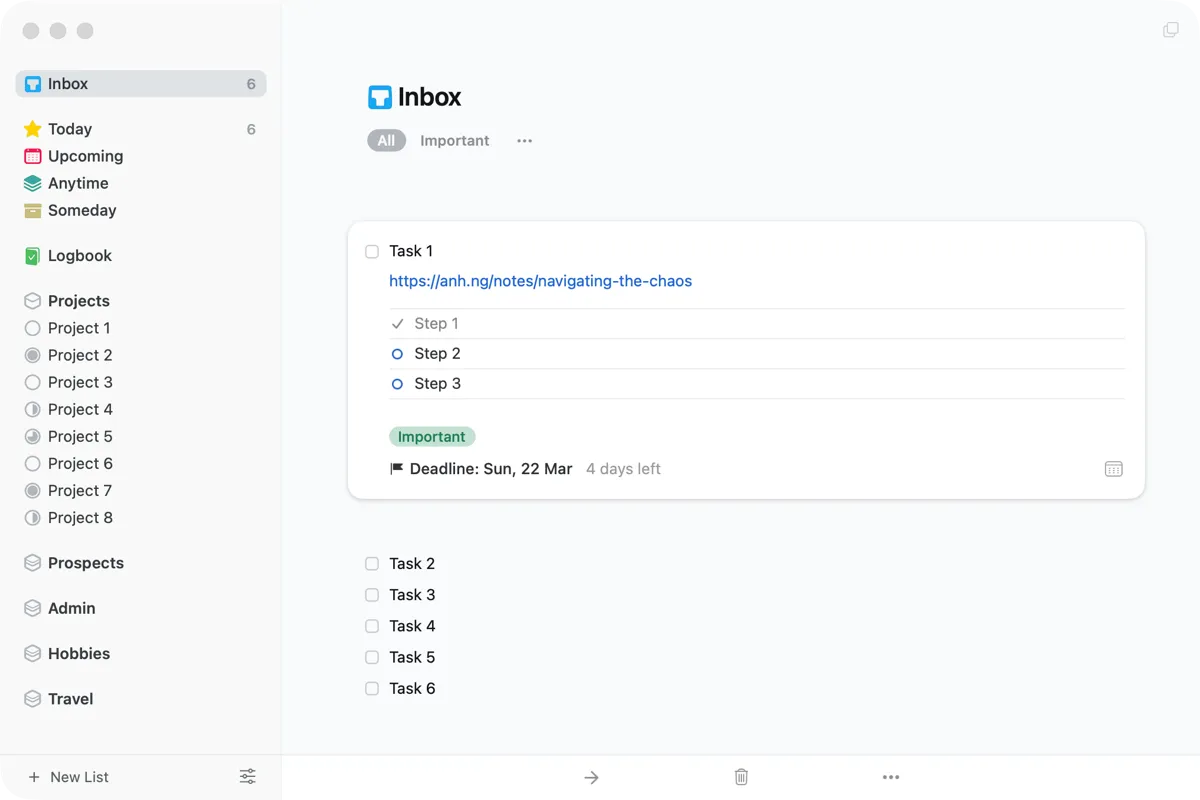
Other than the pre-defined filters (Inbox, Today, Upcoming, Anytime, Someday, Logbook), this is how I set up the rest (called Areas in Things):
- Projects: Each list is a project. Can be personal or commercial.
- Prospects: Each list is either a new personal project idea or a project in the planning phase.
- Admin: Each list is a (somewhat) personal aspect. I have ones like
Profile(to manage personal branding assets, for example) orWishlist. - Hobbies: Each list is a hobby. I have ones for
Fountain Pens,Backpacks,Sewing, etc. I add what I want to research and what I need to buy. - Travel: Each list is a trip.
Notes and ideas
My preferred method of idea keeping is a physical notebook and fountain pens. I’m using a Midori MD in A6, which is with me most of the time, and an Asvine V126 with a medium nib, which is a budget-friendly gem.
Raw ideas and notes go into my pocket notebook, then I organize and refine them in Obsidian. I sync my vault with Obsidian Sync.
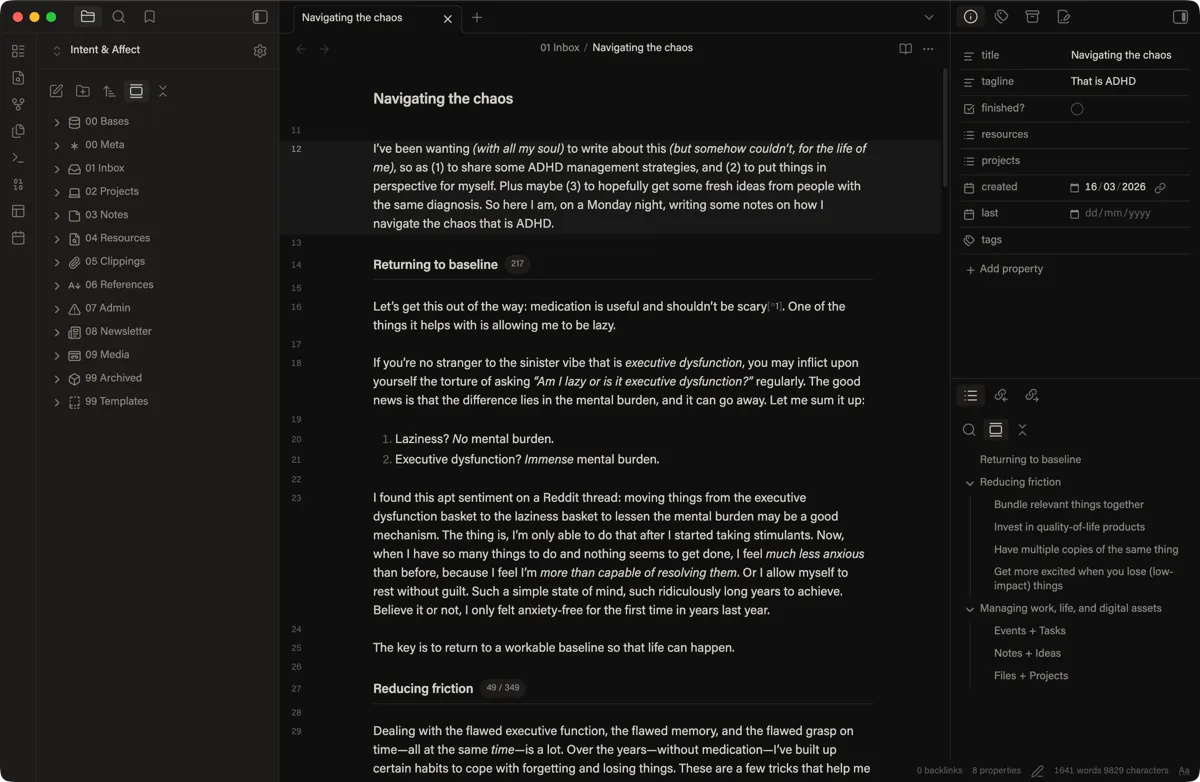
This is how I set up my vault—this looks like a lot, but the first two and the last three folders are generally what I don’t touch often:
- Bases: Obsidian databases.
- Meta: Documentation on my vault setup, writing style guide, etc.
- Inbox: Things I’m currently working on.
- Projects: Projects and project ideas.
- Notes: Thoughts and writing ideas.
- Resources: Research, collections, and samples from different topics.
- Clippings: Collected articles and quotes from other writers.
- References: Movies, books, friends, collaborators, etc.
- Admin: Personal information and housekeeping.
- Newsletter: Issues for my newsletter.
- Media: Images used throughout this vault.
- Archived: Things I no longer need to revisit.
- Templates: Templates used in this vault.
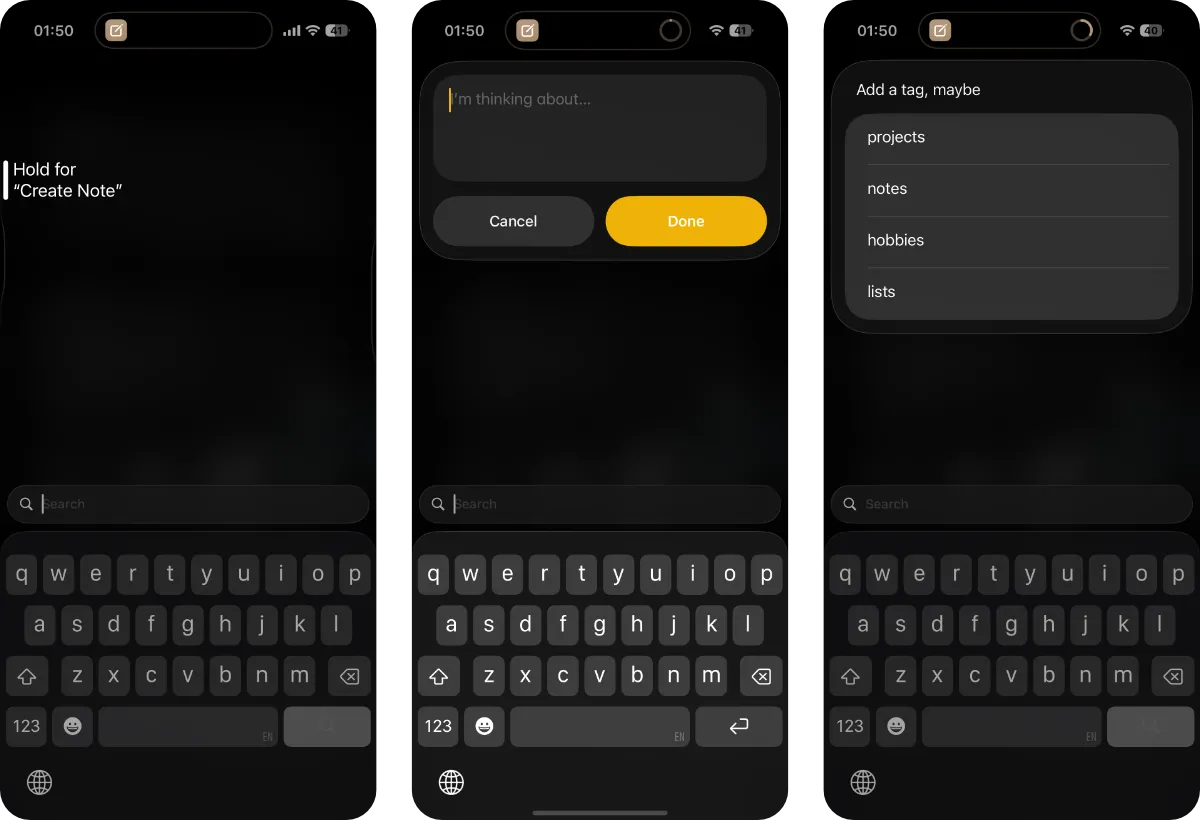
Other than full-fledged ideas and long-form notes in Obsidian, I set up a shortcut to create a new Apple Notes entry with an optional tag, assigned to the Action button on my iPhone, for quick capture. This works anywhere when I use my phone, so it has been tremendously helpful when I need to remember something while in another app. If you don’t have an Action button iPhone, you can still add this shortcut to the Control Center for quick access.
Files and projects
I currently sync most of my files with OneDrive. I don’t have much rationale for this other than that my brother started a family plan a few years ago. Been serving me well, not many complaints.
01 Projects
|	00 Profile
|	|	CV
|	|	Portfolio
|	|	Portrait
|	01 Design
|		2026 Project A
|		|	01 Final
|		|	02 Editables
|		|	03 Resources
|		|	04 Updates
|		|	05 WIP
|		2026 Project B
|		2026 Project C
02 Threads
|	Documents
|	Music
|	Photography
03 Resources
|	Lectures
|	Library
|	Licenses
|	Refs
04 Vaults
|	Obsidian
|	Typeface
|	Unclutter
99 Unsorted
I’ve been using this folder structure for a while now (I did limit subfolders for privacy, by the way, so this is not everything). I’d occasionally rename something, but the gist stays the same. I don’t sync folders I have archived on my devices.
More on the main folder structure:
- Projects: Other than the
Profilefolder, the rest are work categories. - Threads: Files that can be grouped into a topic form a thread. Some frameworks call this
AreasbutThreadsfits my usage better. - Resources: Useful materials I collect. The general rule is that these files aren’t created by me.
- Vaults: App vaults. Such as my font collection imported into Typeface.
- Unsorted: Files that I haven’t sorted.
More on the project folder structure (which might sound a little verbose since it’s fairly self-explanatory):
- Final: Final files of a project.
- Editables: Working files, which can be opened and edited.
- Resources: Design assets, e.g., logos, stock images, photos of sketches, etc.
- Updates: Presentation files and quick update files.
- WIP: Every exported file that is not the final design.
To easily sort project files by date, I name them in this format: YYMMDD-ProjectTitle-FileName. For example, 260317-AHDH-Logo.
All that being said, I still have a lot to work on, like how to manage my focus or how I perceive time. But compared to a few years ago, I’ve come a long way in understanding what works for my life. I’ve realized that a lot of the ADHD tactics involve some degree of tricking your brain into cooperating. And maybe all of this has nothing to do with ADHD; you can just try them out and see if they are useful? Well, minus the stimulants, of course.
Footnotes
-
Please check with your doctor. I’m not saying to just start medication all by yourself. ↩︎
Planted
Tended